Attention dead ends in my family tree: I’m coming after you with my new secret weapon. You cannot hide.A few days ago I felt disappointed with my system for finding vital records. I’ve got Grandpa’s hometown’s vital records on my computer, downloaded from the Italian Antenati website. I spent a lot of time renaming each file to include the name of the person who was born, died, or got married on that date. That makes the files searchable with Window File Explorer.I felt disappointed for a few reasons:Windows File Explorer can’t do a restricted search. If I search for Pietro Iamarino (Grandpa), the results include files with both Pietro and Iamarino. They’re not necessarily together. I can get too many useless results. Adding quotes, “Pietro Iamarino”, doesn’t help.When there are a lot of results, I can’t tell them apart. I may be looking for a death record from the 1840s, but many of the results are birth and marriage records. I wish I could tell which is which without opening them all.The search term (“Pietro Iamarino”) isn’t highlighted in the results when I view them as a list.I needed a better way to search my document collection.Then I remembered a program called Everything. A couple of years ago, I wanted to search my computer for files to add to my weekly computer backup. I needed to know which files were new or updated since my last backup. Computer professionals recommended a program called Everything. In the end, I developed another system for my backups instead of using Everything. (NOTE: This is a PC-only program, as so many are. Maybe Finder already does what you need.) Because I knew how I would have names these images, my secret weapon found the photos instantly.Could I use Everything to search for names in my document collection? I went to the CNET website to download Everything again. My first test worked like a charm. My cousin has been texting me old family photos, and a couple of them looked familiar. I wondered, did she give me these already? There was a photo of my Uncle Al leaning on a car, and a pigeon coop on the rooftop of my mom’s old building. I searched Everything for “SarracinoAlfredo” (that’s how I would have named it). I found SarracinoAlfredoLeaningOnCar.jpg. That was it! I searched for “pigeon” and found “PigeonCoop260E151stStreetBronxNY.” That was it, too!Then came my Aha moment. Could Everything give me the search features that were missing from File Explorer? Yes, it could!If I put an exact name in quotes, Everything gives me only that exact name, highlighted in bold. Better yet, I can see the full file path of each document. I can click the Path column to sort by the file location. Then I can pick out, say, the death records between 1815 and 1830. What a time saver!
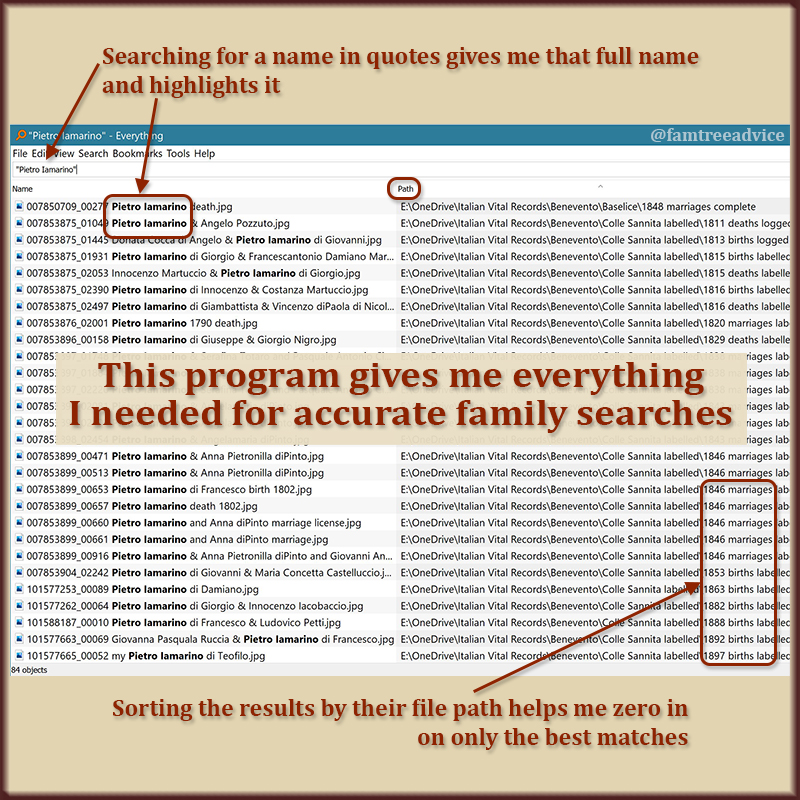 This PC program solves the problem, giving me precise search results.I’m still working hard on the family tree of my latest DNA match. I found that both her parents are my 6th cousins on my dad’s side, and she is a DNA match to both my parents. I desperately want to find one of her ancestors with some connection to my mom’s family.Now I can focus on each dead-end branch in her tree. I can use Everything, my secret weapon, to find every document for a particular person. I’ve been looking at one family name, hoping it may lead to my mom. It’s an uncommon name in the town. I can quickly generate a list of every document with that name and track them down.
 I can search across all my genealogy documents and find exactly who I need.There’s no need to use quotation marks when searching for a single name. And sometimes I’m not sure the name on a death record will match the name on a birth record. If she’s Maria Iamarino on her death record, she may be Maria Teresa Iamarino on her birth record. A search for “Maria Iamarino” (with quotes) won’t show Maria Teresa Iamarino, but a search for Maria Iamarino (without quotes) will.In a couple of days I used Everything to find tons of documents that were missing from my family tree. I’m breaking down brick walls left and right. I’m inspired to keep renaming the files from my other towns, not just Grandpa Iamarino’s town.I know you don’t all have Italian ancestors. And you may not have huge collections of vital records available to you. But I’ll bet you have photos and genealogy records scattered across your computer. Every time my mom asks me for a specific family photo, I struggle to find it. Now it’s so much easier.I’ve just scratched the surface with Everything. I’m sure there’s much more it can do for me and you. Meanwhile, I’ve got so many loose ends I can tie up!Follow me wherever you like: Twitter, Facebook, Instagram, Pinterest, LinkedIn, or Bloglovin.
Let Me Demolish Your Italian Brick Wall
If you like the idea of discovering all your Italian ancestors but haven’t got the time, let me do it. Read more at Italian Ancestry Services. (function(i,s,o,g,r,a,m){i[‘GoogleAnalyticsObject’]=r;i[r]=i[r]||function(){ (i[r].q=i[r].q||[]).push(arguments)},i[r].l=1*new Date();a=s.createElement(o), m=s.getElementsByTagName(o)[0];a.async=1;a.src=g;m.parentNode.insertBefore(a,m) })(window,document,’script’,’https://www.google-analytics.com/analytics.js’,’ga’); ga(‘create’, ‘UA-90479847-1’, ‘auto’); ga(‘send’, ‘pageview’); gtag(‘config’, ‘UA-90479847-1’);
Source: My Secret Weapon for Finding Relatives