
Here’s how my combo of genealogy tools is tying up a long list of loose ends.I’m ready to place almost every 19th century inhabitant of Grandpa’s town into my family tree. Then it’s on to each of my other ancestral hometowns.Here’s how I’m bringing all my obsessive processes together in one genealogical symphony. Get yourself armed with knowledge and ready to find the documents you’re missing.Instrument 1: Vital RecordsI’ve downloaded vast collections of Italian vital records from my ancestors’ hometowns. They’re arranged on my computer by province, then by town. For each town I have individual folders for:each year’s birth recordseach year’s death records, andeach year’s marriage records.This simplifies searching.Instrument 2: File NamingIt didn’t take as long as you’d think to rename each image file, adding the subject’s name. This is a birth record image containing 2 facing pages: 101577262_00006.jpg. I want to keep that number because it identifies the URL of the original file online. But I want to add the names of the 2 babies shown in the image. So I renamed the file 101577262_00006 Donato Petoscello & Maria Carmela Basile.jpg.When the last name is important in my family, I include the subject’s father’s name. That helps me locate the right document faster. For example, 101577262_00020.jpg became 101577262_00020 Maria Teresa Pozzuto di Francesco & Giuseppantonio Zeolla di Giovanni.jpg. The “di” is Italian for “child of” and a handy shorthand.Instrument 3: Document TrackerAs my family tree grew, I wanted an easy way to see which documents I had and didn’t have for any given person. I made a document tracker spreadsheet. It’s part of my process to record each document I find in the spreadsheet.I labelled the last column “Need to find.” That’s where I keep list which documents I’m missing for each person in the list. It doesn’t include everyone in my tree—only those with a document I found.Instrument 4: EverythingThis PC program is my new genealogy secret weapon. (Mac users may want to try NeoFinder.) It gives me Everything I need to locate any re-named document image on my computer.Conducting the OrchestraMy process is this:Go through my document tracker, focusing on names from my grandfather’s town.Find people who are missing a vital record: birth, marriage, or death.Search for the missing document with the Everything program.If found, add the document to the family tree and mark it as complete in the document tracker.If not found, mark it as “out of range” in the document tracker.Here’s an example:
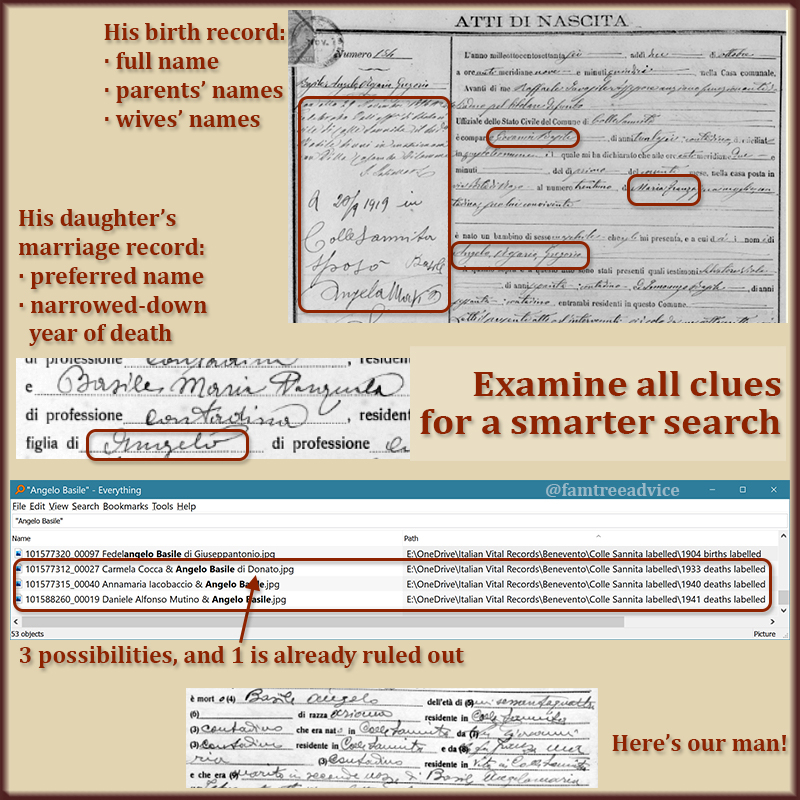 Prepare for your search by gathering the necessary clues.Angelo Rosario Gregorio Basile was born in Colle Sannita on 1 Oct 1876. I have his birth record. He married twice. A clerk wrote the marriage dates and his wives’ names on his birth record. Both marriage records (1896 and 1919) are out of the range of available records. It’s his death record I want to find.Experience tells me his death record will not have his full name: Angelo Rosario Gregorio Basile. I need to know which name he used. I have the 1933 marriage record for his daughter. It says her father is Angelo Basile, and he’s still alive. So I need a death record for an Angelo Basile who died in 1933 or later. (The death records in the collection end in 1942.)I use my new favorite program, Everything, to search for “Angelo Basile”. I sort the results by the Path column so I can look only for a death record between 1933 and 1942.There are 3 choices. The first one is no good because his father is Donato. I’m looking for the son of Giovannantonio.The next death record, from 1940, is Angelo Basile, the son of Luigi. That’s the wrong man.The final death record, from 1941, is Angelo Basile, the son of Giovanni (gasp!). His mother was Maria Franza. And his 2nd wife was Angelamaria Basile. This is, in fact, the death record I needed for Angelo Rosario Gregorio Basile.Now I can:add the facts to my family treecrop the imageannotate the imageadd it to my tree, andcreate a source citationThen I can update Angelo in my document tracker. His final note is “out of range: marriages” because they are not available. I hope they will be in the future. If this were his last missing document, I would put “n/a” in his “Need to find” column.This victory inspires me to continue down the list. Combining (1) renamed vital record files, (2) the Everything program, and (3) my document tracker, I’ll close the book on everyone from this town. Eventually.If you aren’t as obsessive about your entire ancestral town as I am, read on.If you decide to use a document tracker, you’ll know what you have and what you’re missing for everyone in your family tree. In 2019 I searched for missing census records for all the Americans in my family tree. That focus helped me close the book on many families.Go through your people alphabetically or by document type. Search for every missing census sheet or ship manifest or draft registration card. Take the time to do another search, and you’ll have several successes.I’m obsessed with my Italian towns, so I’m focusing on one town at a time. I will document all my towns, given enough time. And that, my friends, is my symphony of genealogy tools reaching its crescendo.Follow me wherever you like: Twitter, Facebook, Instagram, Pinterest, LinkedIn, or Bloglovin.
Let Me Demolish Your Italian Brick Wall
If you like the idea of discovering all your Italian ancestors but haven’t got the time, let me do it. Read more at Italian Ancestry Services. (function(i,s,o,g,r,a,m){i[‘GoogleAnalyticsObject’]=r;i[r]=i[r]||function(){ (i[r].q=i[r].q||[]).push(arguments)},i[r].l=1*new Date: ();a=s.createElement(o), m=s.getElementsByTagName(o)[0];a.async=1;a.src=g;m.parentNode.insertBefore(a,m) })(window,document,’script’,’https://www.google-analytics.com/analytics.js’,’ga’); ga(‘create’, ‘UA-90479847-1’, ‘auto’); ga(‘send’, ‘pageview’); gtag(‘config’, ‘UA-90479847-1’);
Source: How to Tie Up Loose Ends in Your Family Tree